 Return to the range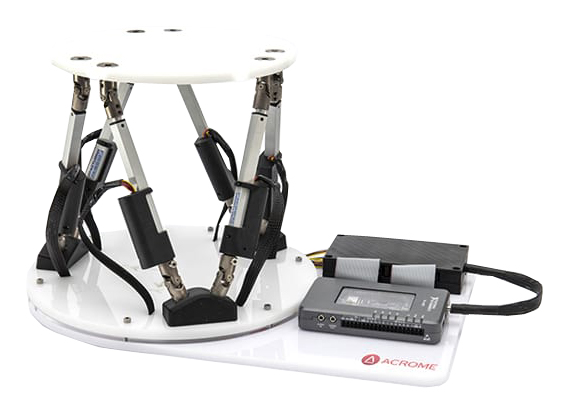
Stewart 6-axis platform
6-axis positioning platform
6-axis positioning platform
Acrome's Stewart Platform provides realistic 6-DOF simulations using highly sensitive linear actuators, a gyroscope, and a three-axis accelerometer. The accessibility and user-friendliness of its components make it suitable for simulating real-world systems such as flight simulators, machine tools, crane technology, mechanical bulls, and precision positioning platforms (telescopes, antennas, orthopedic surgery, etc.).
The Stewart Platform teaching system allows students to learn the fundamentals of positioning control, such as common space schemes, trajectory generation, parallel kinematics, etc.
The Stewart Platform consists of an operational section (ref. AO00) with six DC linear motors, a 6-DOF inertial unit, and a gyroscope. The control section includes an electronic interface connected to a control/command card. This card can be selected based on the programming language preferred by the teaching team. The available control/command boards are:
. MyRIO board for programming from LabVIEW (ref. AO01)
. Arduino Mega card for programming from MATLAB Simulink (ref. AO02)
. Raspberry PI3 card enabling programming from Python (ref. AC//RPi3)
It is possible to purchase a single operating unit and different control/command cards to increase the educational coverage of the Stewart Platform.
This system comes with digital documentation including:
. An assembly and user manual
. A course manual and practical work manual
. The LabVIEW and MATLAB Simulink programs
. 6-axis positioning platform
. 6 DC linear motors
. A 6-degree-of-freedom inertial measurement unit
. Electronic interface card between the operating part and the control cards (myRIO, Arduino, and Raspberry)
. Fully compatible with LabVIEW and MATLAB Simulink
. Open source software structure for customizing desired applications
AO00 : Stewart 6-axis platform, without control command
AO01 : Control with MyRIO
AO02 : Control with Arduino Mega
AC//RPi3: Control with Raspberry Pi 3
Video: Plateforme Stewart
 Plateforme Stewart